MISSION, Kan., Jan. 21, 2026 (GLOBE NEWSWIRE) -- (Family Features) Playing video games can be a fun, social experience. However, online gaming also poses real risks, especially for kids. As a parent, you don’t necessarily need to be a gamer yourself to help keep your children safe when the controller is in their hands.

Consider taking proactive steps like these to create a healthy online gaming environment for kids of all ages.
Check System Privacy Settings
As a first line of defense – before your child even starts gaming – spend some time in the device or console privacy settings. Here you can turn off sharing, disable location tracking, limit microphone and camera access and restrict how other users can interact with your child’s profile. Similarly, many games and platforms include built-in privacy settings that can be tailored to your child’s age and online experience. These settings may allow you to limit who can view your child’s profile or send a friend request, message or voice chat.
Research Games
Because not all games are created equal, look up game ratings through a service such as ESRB before buying or downloading to understand the maturity level of the game and determine if it’s appropriate for your child. To take it a step further, read reviews from other parents or watch gameplay videos to see if you deem not only the content but also the social interaction acceptable.
Use Facial Age Estimation
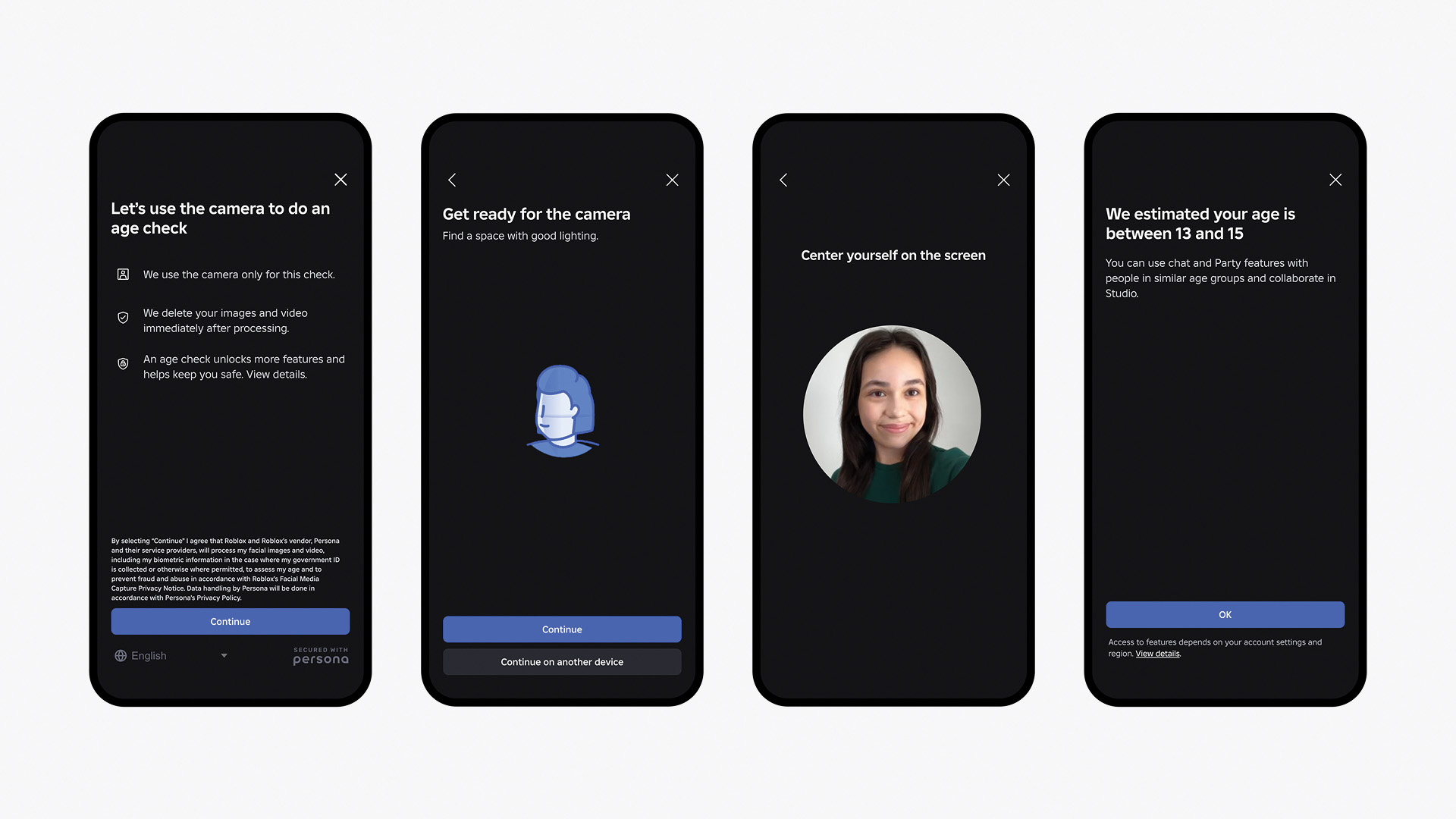
Online platforms are increasingly looking for ways to keep users safe, and that includes added levels of verification. As part of a multilayered approach to safety, Roblox is the first online gaming platform to require age checks for users of all ages to access chat features, enabling age-appropriate communication and limiting conversations between adults and minors. These secure age checks are designed to be fast, easy and secure using Facial Age Estimation technology directly within the app.
“Our commitment to safety is rooted in delivering the highest level of protection for our users,” said Matt Kaufman, chief safety officer at Roblox. “By building proactive, age-based barriers, we can empower users to create and connect in ways that are both safe and appropriate.”
Once age-checked, users are assigned to one of six age groups: under 9, 9-12, 13-15, 16-17, 18-20 or 21 and older, ensuring conversations are safe and age appropriate. Age checks are optional; however, features like chat will not be accessible unless an age check is completed. Chat is also turned off by default for children under age 9, unless a parent provides consent after an age check.
Keep Personal Information Private
It’s seldom a bad idea to be extra cautious when interacting with strangers online, even if they seem friendly enough while playing the game. Teach children what information not to share, including their full name, address, birthday, school name, phone number, email address, passwords or any photos that may contain any personal information (like a house number or school logo) in the background. Also encourage a screen name and generic avatar for added privacy.
Turn on Parental Controls
Designed to allow parents a supervisory role in their child’s online gaming experience, parental controls on many platforms include the ability to set schedules and limit playtime, restrict access to certain content or social features, require a password for purchases or set a spending limit.
Avoid Clicking Unfamiliar Links
Player profiles and in-game chats may include links to external sites, including those promising rewards or cheat codes. Because they can be used to gain access to personal information, remind your children to ask an adult before clicking any unfamiliar links while gaming so they can be verified as trustworthy.
Employ Privacy and Security Tools
While system or console-specific settings allow parents to set content restrictions, approve downloads, manage friends lists and more, additional layers of security are sometimes necessary. Extra safeguards such as antivirus and internet security software, DNS (domain name system) filtering and two-factor authentication can also be enabled to help keep kids safe online.
For more tools to help parents make informed decisions and support their children’s gaming experience, visit corp.roblox.com/safety.
Photo courtesy of Shutterstock (father and daughter playing video game)
Michael French
mfrench@familyfeatures.com
1-888-824-3337
editors.familyfeatures.com
About Family Features Editorial Syndicate
A leading source for high quality food, lifestyle and home and garden content, Family Features provides readers with topically and seasonally relevant tips, takeaways, information, recipes, videos, infographics and more. Find additional articles and information at culinary.net and eLivingToday.com. Family Features is a division of 4media group, the global strategic communications agency built for brands that want results.
Photos accompanying this announcement are available at
https://www.globenewswire.com/NewsRoom/AttachmentNg/69568f7a-d43b-4c29-8357-707a0b44bdf0
https://www.globenewswire.com/NewsRoom/AttachmentNg/6f35044c-646a-4419-9eea-178b6f6439a1
